> ## Documentation Index
> Fetch the complete documentation index at: https://docs.findly.ai/llms.txt
> Use this file to discover all available pages before exploring further.
# Metrics
> Dive into how to manage metrics and how you can use them for in-depth analysis.
Connecting to databases other than Google Analytics requires an Enterprise
plan. [Contact Sales](mailto:hello@findly.ai) for details.
## Introduction to Metrics
Metrics provide quantifiable measurements to gauge performance, behavior, and other essential information. They facilitate in-depth analysis by offering insights not readily apparent from raw data.
## Defining Metrics
Defining metrics involves several key parameters:
The reference name for the metric, which must be unique across all metrics.
A detailed overview of the metric.
Type of metric (simple, ratio, cumulative, derived).
Parameters specific to each metric type.
## How to create and edit a metric
In the [Catalog](https://dashboard.findly.ai/app/catalog) section, click the `Manage` button on the desired data source. Then, navigate to the `Metrics` tab to create or edit a metric.
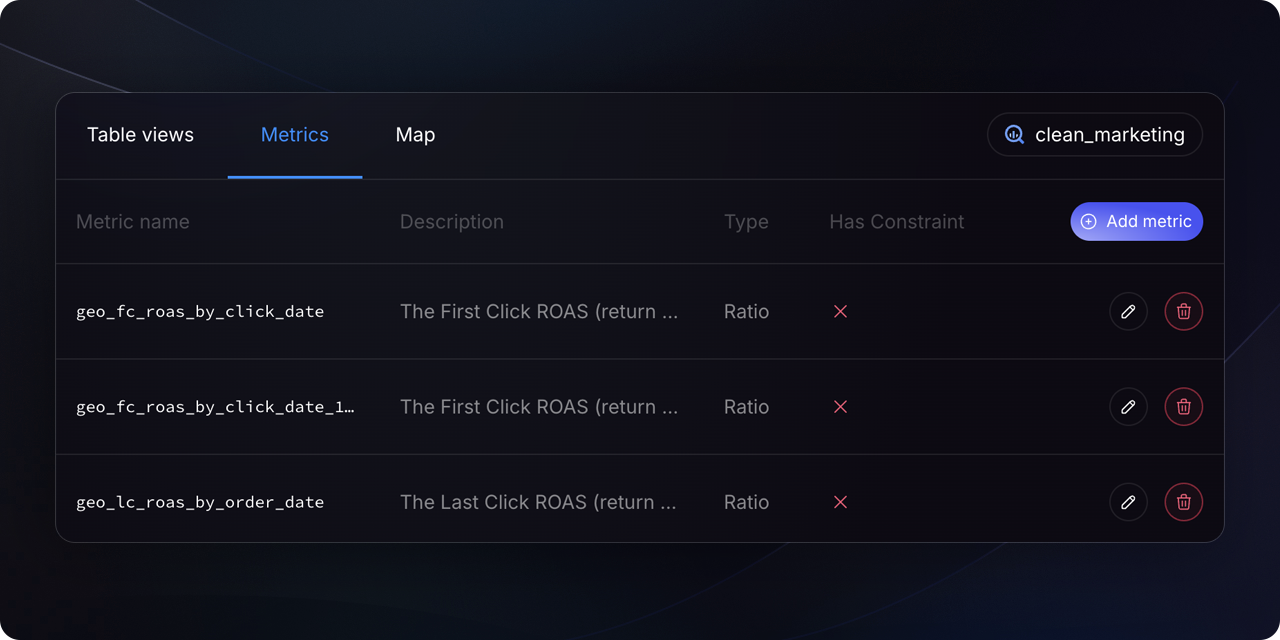
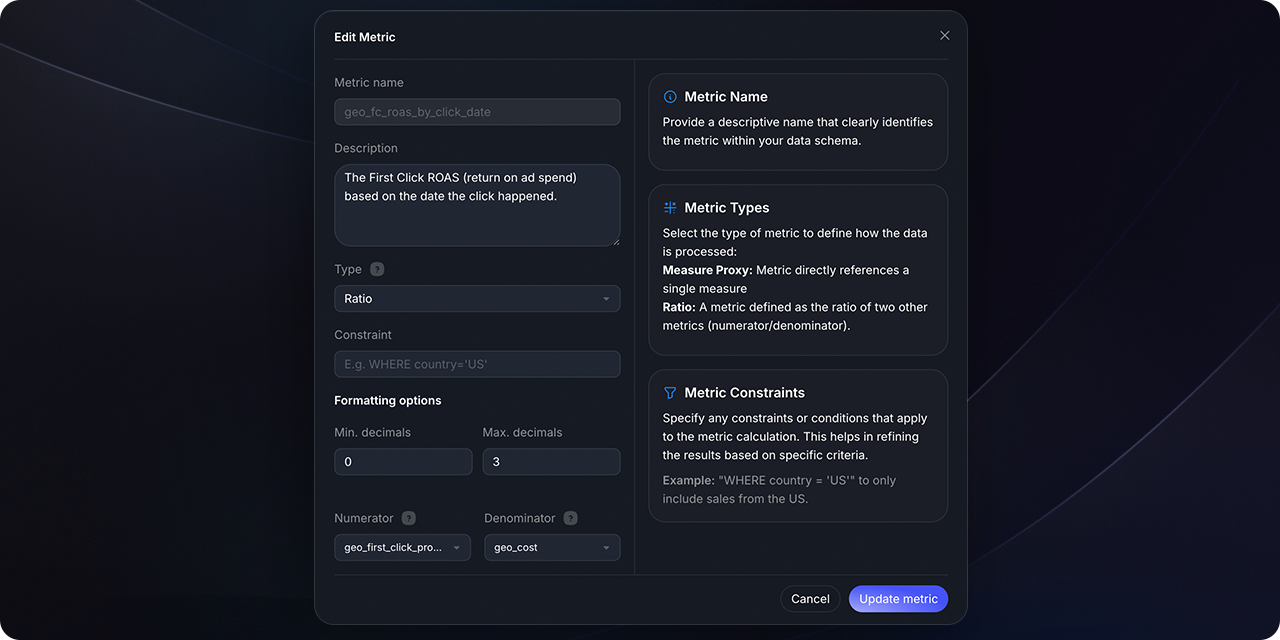 To better understand the structure, here's an illustrative example of a metrics specification:
```yaml theme={null}
metrics:
- name: order_total
description: Total orders processed.
type: simple
type_params:
measure: order_count
label: Total Orders
```
## Supported Metric Types
Findly supports various metric types:
Simple metrics directly reference a measure. They can be thought of as a function accepting a single measure as input.
Example:
```yaml theme={null}
metrics:
- name: cancellations
type: simple
type_params:
measure: cancellations_count
filter: |
{{ Dimension('order__value') }} > 100 and {{ Dimension('user__acquisition') }}
```
Cumulative metrics aggregate a measure over a defined time window. If no window is specified, the aggregation occurs over all time.
Example:
```yaml theme={null}
metrics:
- name: wau_rolling_7
type: cumulative
type_params:
measures:
- distinct_users
window: 7 days
```
Derived metrics use expressions involving other metrics, enabling calculations based on existing metric values.
Example:
```yaml theme={null}
metrics:
- name: order_gross_profit
type: derived
type_params:
expr: revenue - cost
metrics:
- name: order_total
alias: revenue
- name: order_cost
alias: cost
```
Ratio metrics compute a ratio between two metrics. Constraints can be applied to the numerator, denominator, or both.
Example:
```yaml theme={null}
metrics:
- name: cancellation_rate
type: ratio
type_params:
numerator: cancellations
denominator: transaction_amount
```
When creating metrics, maintain consistency in definitions. Avoid overlapping
names and ambiguity to ensure clarity.
## Conclusion
Metrics are crucial for deriving actionable insights. Understanding the various metric types and their definitions will enable you to build comprehensive data models.
No, metric names should be unique across all semantic models to prevent
ambiguity and ensure clarity in analysis.
To better understand the structure, here's an illustrative example of a metrics specification:
```yaml theme={null}
metrics:
- name: order_total
description: Total orders processed.
type: simple
type_params:
measure: order_count
label: Total Orders
```
## Supported Metric Types
Findly supports various metric types:
Simple metrics directly reference a measure. They can be thought of as a function accepting a single measure as input.
Example:
```yaml theme={null}
metrics:
- name: cancellations
type: simple
type_params:
measure: cancellations_count
filter: |
{{ Dimension('order__value') }} > 100 and {{ Dimension('user__acquisition') }}
```
Cumulative metrics aggregate a measure over a defined time window. If no window is specified, the aggregation occurs over all time.
Example:
```yaml theme={null}
metrics:
- name: wau_rolling_7
type: cumulative
type_params:
measures:
- distinct_users
window: 7 days
```
Derived metrics use expressions involving other metrics, enabling calculations based on existing metric values.
Example:
```yaml theme={null}
metrics:
- name: order_gross_profit
type: derived
type_params:
expr: revenue - cost
metrics:
- name: order_total
alias: revenue
- name: order_cost
alias: cost
```
Ratio metrics compute a ratio between two metrics. Constraints can be applied to the numerator, denominator, or both.
Example:
```yaml theme={null}
metrics:
- name: cancellation_rate
type: ratio
type_params:
numerator: cancellations
denominator: transaction_amount
```
When creating metrics, maintain consistency in definitions. Avoid overlapping
names and ambiguity to ensure clarity.
## Conclusion
Metrics are crucial for deriving actionable insights. Understanding the various metric types and their definitions will enable you to build comprehensive data models.
No, metric names should be unique across all semantic models to prevent
ambiguity and ensure clarity in analysis.