> ## Documentation Index
> Fetch the complete documentation index at: https://docs.findly.ai/llms.txt
> Use this file to discover all available pages before exploring further.
# Identifiers
> Explore the role of identifiers in our semantic model and how they facilitate comprehensive data analysis.
Connecting to databases other than Google Analytics requires an Enterprise
plan. [Contact Sales](mailto:hello@findly.ai) for details.
## What are Identifiers?
Identifiers represent real-world concepts within a business context, like customers, transactions, or ad campaigns. Analyses frequently revolve around specific identifiers, for example, in customer churn analysis or annual recurring revenue modeling. In semantic models, these identifiers are represented by ID columns, which act as join keys to link different semantic models within the semantic graph.
Identifiers offer a clear structure to the underlying data, enabling more coherent and insightful analysis.
## How to Define Identifiers
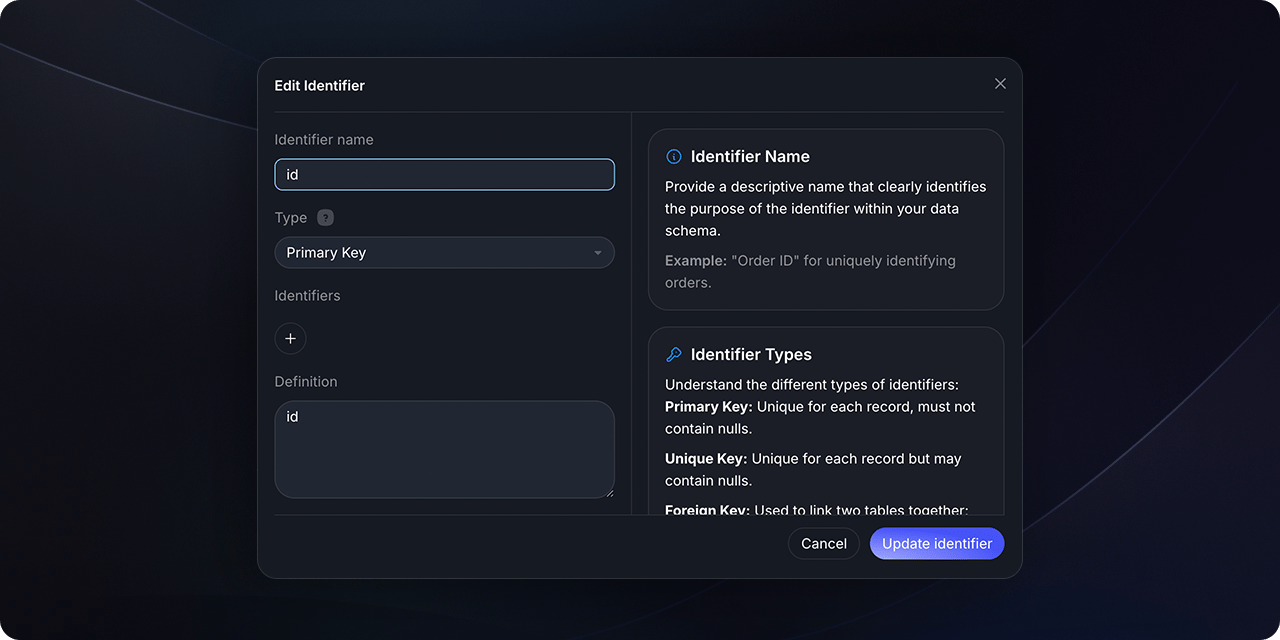
Every identifier requires a name and type. The name can reference the key column name from the data table, or function as an alias with the column name referenced in the expr parameter.
Refers to the key column name from the underlying data table or serves as an
alias if the actual column name is specified in the `expr` parameter.
Defines the identifier's role in join logic and determines the join type
(e.g., Primary, Foreign, Unique).
Specifies the underlying column for the identifier. If omitted, it defaults
to the identifier's name.
## How to create and edit an identifier
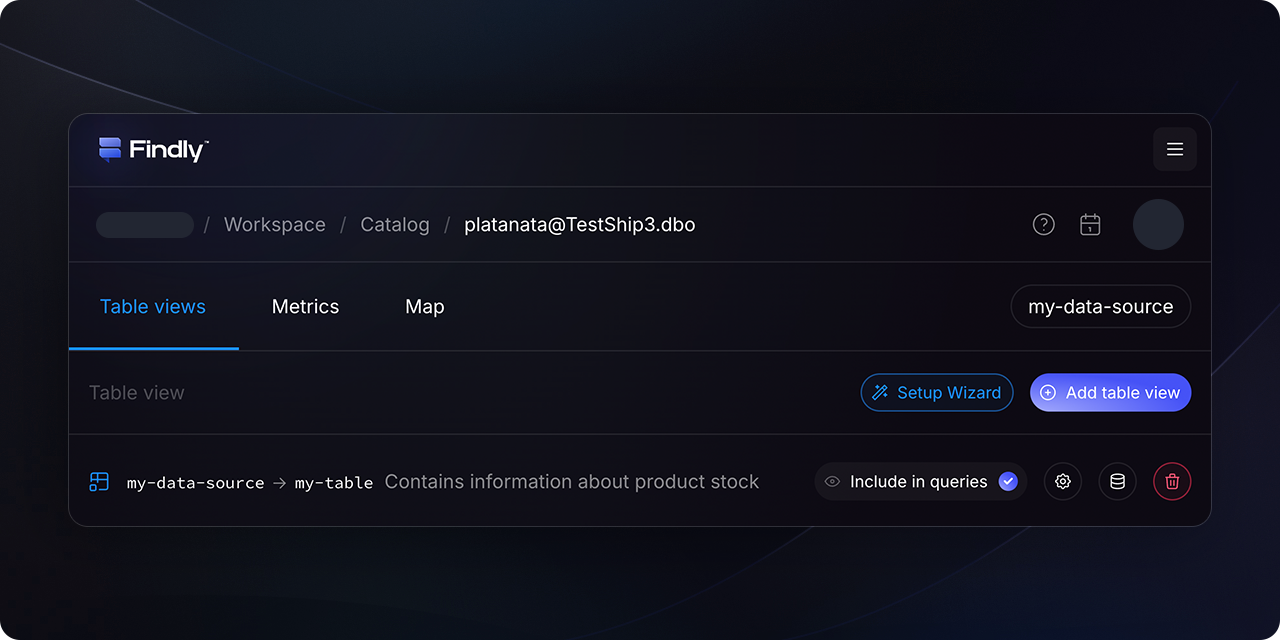
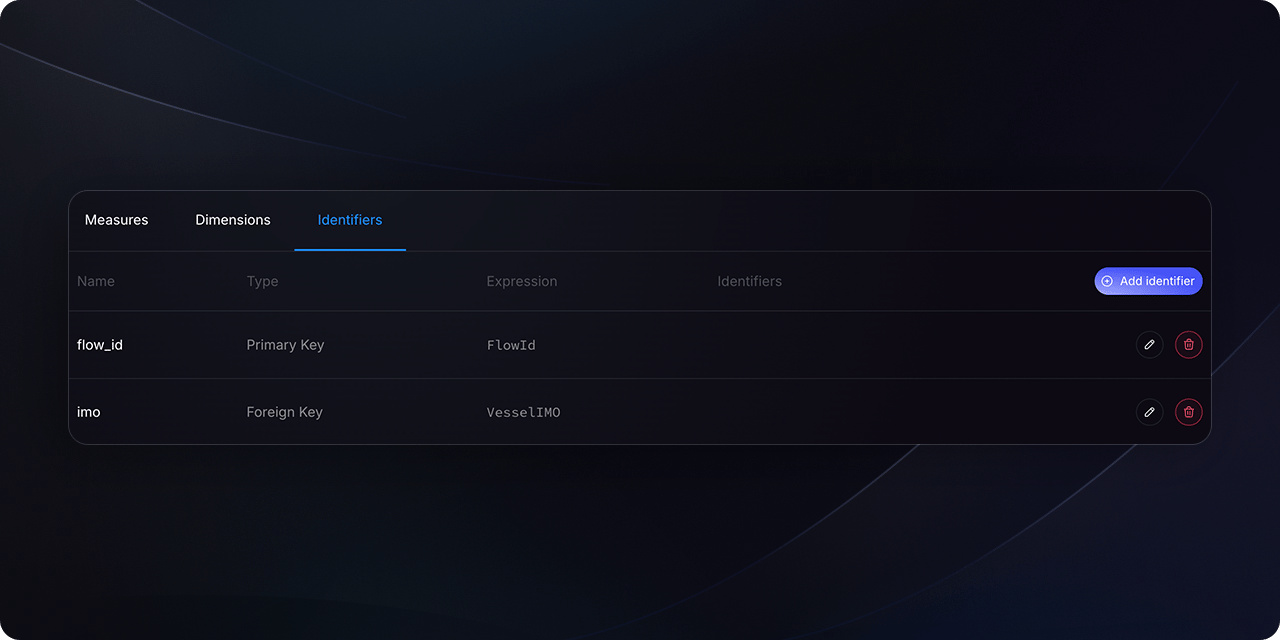
In the [Catalog](https://dashboard.findly.ai/app/catalog) section, select the table for which you want to set up an identifier. Then, navigate to the `Entities` tab.
 ## Specification for Identifiers
Identifiers are defined using the following parameters:
```yaml theme={null}
identifiers:
- name: [name]
type: [Primary or Natural or Foreign or Unique]
description: [description of the field or role]
expr: [column name or expression, defaults to the name if not provided]
```
For example, in a semantic model for sales data, identifiers could be defined as follows:
```yaml theme={null}
identifiers:
- name: transaction
type: primary
expr: id_transaction
- name: order
type: foreign
expr: id_order
- name: user
type: foreign
expr: substring(id_order from 2)
```
## Identifier Types and Join Logic
Findly uses different join logic based on the identifier type:
A primary identifier indicates that each row in the table represents a
unique record, encompassing all records in the data platform.
A unique key ensures one record per row in the table. It might represent a
subset of records in the data warehouse and can include nulls.
Foreign keys can have none, one, or multiple instances of the same record
and may include null values.
## Specification for Identifiers
Identifiers are defined using the following parameters:
```yaml theme={null}
identifiers:
- name: [name]
type: [Primary or Natural or Foreign or Unique]
description: [description of the field or role]
expr: [column name or expression, defaults to the name if not provided]
```
For example, in a semantic model for sales data, identifiers could be defined as follows:
```yaml theme={null}
identifiers:
- name: transaction
type: primary
expr: id_transaction
- name: order
type: foreign
expr: id_order
- name: user
type: foreign
expr: substring(id_order from 2)
```
## Identifier Types and Join Logic
Findly uses different join logic based on the identifier type:
A primary identifier indicates that each row in the table represents a
unique record, encompassing all records in the data platform.
A unique key ensures one record per row in the table. It might represent a
subset of records in the data warehouse and can include nulls.
Foreign keys can have none, one, or multiple instances of the same record
and may include null values.
Identifiers (join keys) within a semantic model are identified by their name.
Names must be unique within a specific model but can be reused across
different models.
## Utilizing Identifiers as Dimensions
Identifiers can also serve as dimensions, allowing metrics to be aggregated to the identifier's level of granularity.
Absolutely! Identifiers can be used as dimensions, enabling the aggregation of
metrics at the granularity of that particular identifier.
## Wrapping up
Identifiers are foundational elements that establish relationships and ensure seamless data analysis. By understanding identifiers and their applications, businesses can derive richer insights and make more informed data-driven decisions.