> ## Documentation Index
> Fetch the complete documentation index at: https://docs.findly.ai/llms.txt
> Use this file to discover all available pages before exploring further.
# Dimensions
> Explore how Findly handles data categorization and filtering using Dimensions.
Connecting to databases other than Google Analytics requires an Enterprise
plan. [Contact Sales](mailto:hello@findly.ai) for details.
## What are Dimensions?
Dimensions offer a way to group or filter data based on categories or timeframes. Think of them as special labels that simplify data organization and analysis. Within data platforms, dimensions are integral components of a semantic model, alongside identifiers and measures.
In SQL, dimensions typically align with the `group by` clause of your SQL query.
## How to Define Dimensions
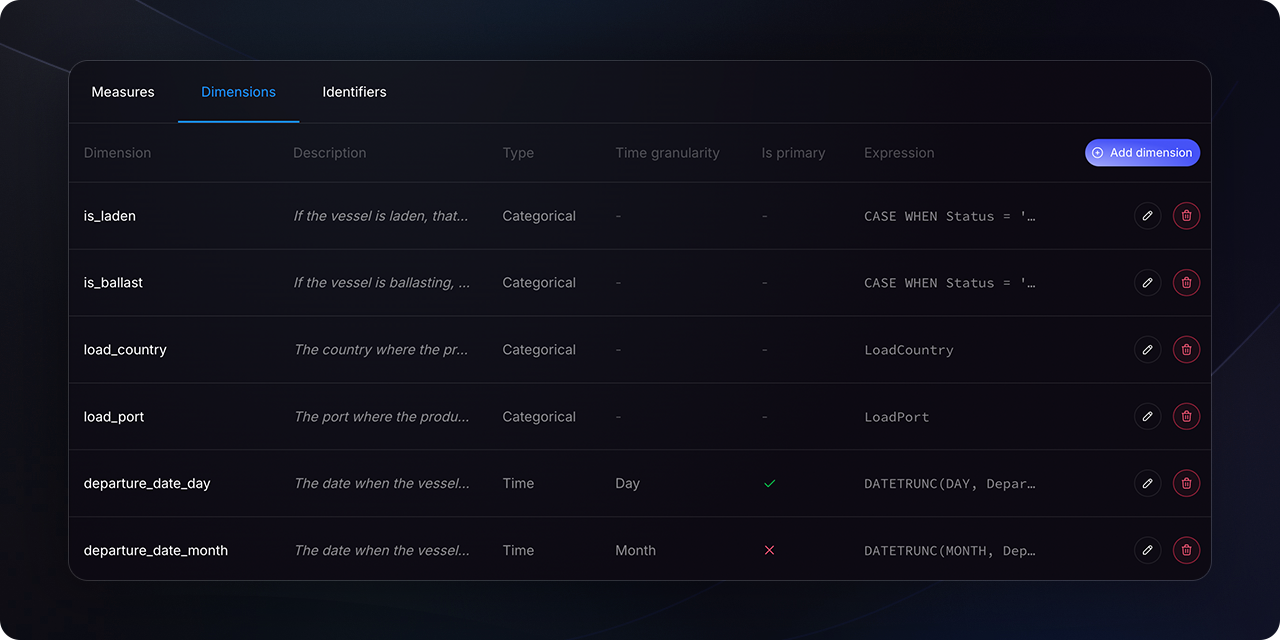
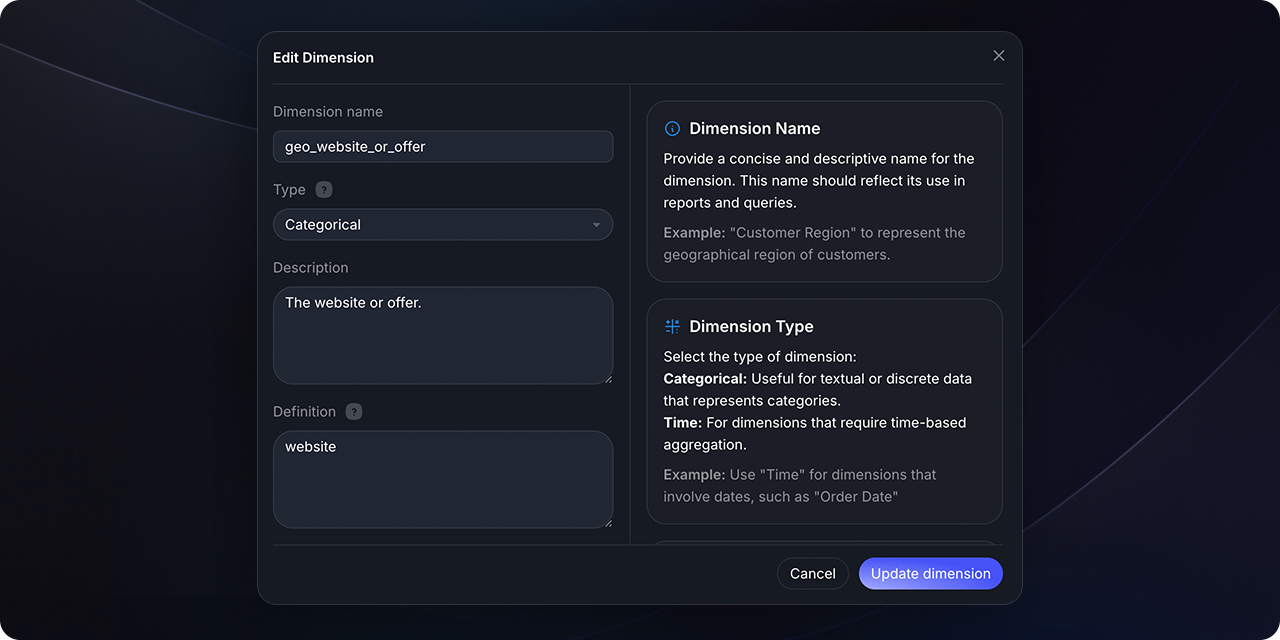
Each dimension requires a name and type, and may include an expression parameter. Key parameters include:
The display name for the dimension. It can serve as an alias if the column
name or SQL query reference (in `expr`) differs.
Defines the dimension's grouping nature in the semantic model (e.g.,
Categorical, Time).
For Time dimensions, specifies the granularity for grouping metrics (e.g.,
day, week, month).
Provides a detailed explanation of the dimension.
Specifies the underlying column or SQL query for the dimension. Defaults to
the dimension's name if `expr` is omitted.
## How to create and edit a dimension
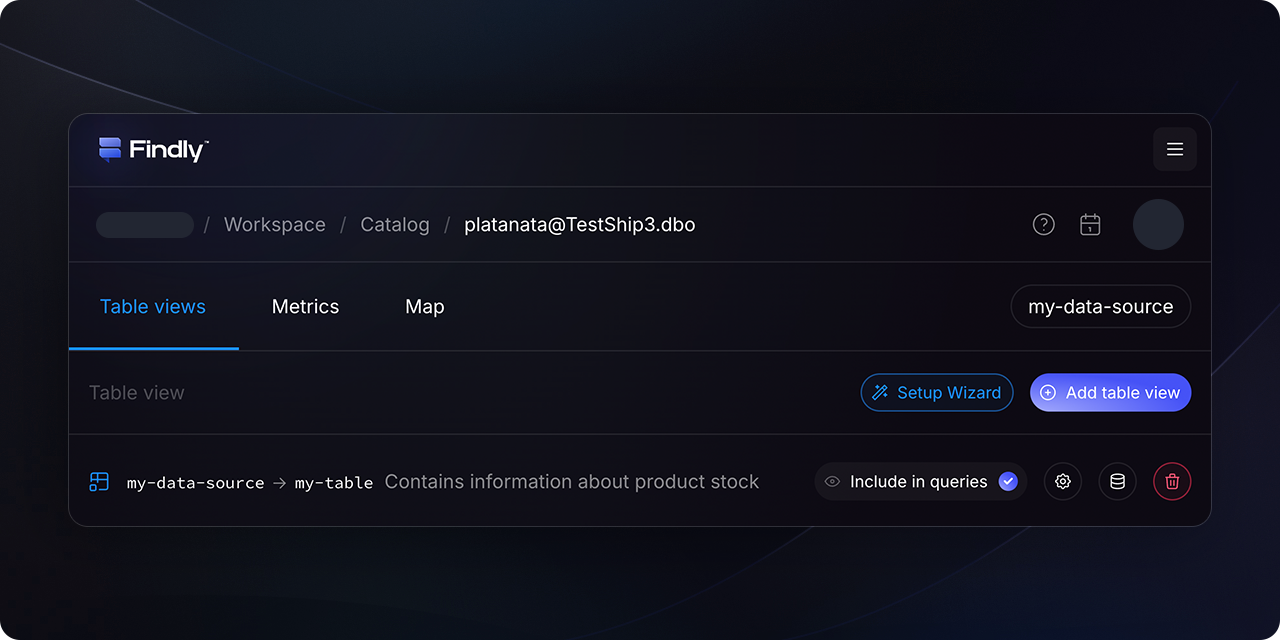
In the [Catalog](https://dashboard.findly.ai/app/catalog) section, select the table for which you want to configure a dimension. Then, navigate to the `Dimensions` tab.
 ## Specification for Dimensions
Dimensions are logically defined using the following parameters:
```yaml theme={null}
dimensions:
- name: [name]
type: [Categorical or Time]
type_params: [specific type parameters]
description: [description]
expr: [column_name_or_sql_expression] # Defaults to dimension name if omitted
```
For example, in a semantic model for transactions:
```yaml theme={null}
semantic_models:
- name: transactions
description: A record of every transaction. Carts are grouped as multiple transactions per SKU.
model: {{ ref("fact_transactions") }}
defaults:
agg_time_dimension: metric_time
dimensions:
- name: metric_time
type: time
expr: date_trunc('day', ts)
- name: is_bulk_transaction
type: categorical
expr: case when quantity > 10 then true else false end
```
Note: To correctly identify and process dimensions, each dimension must be associated with a primary identifier.
## Types of Dimensions
Findly supports two primary types of dimensions: Categorical and Time.
Categorical dimensions facilitate grouping metrics by categories, like product type or geographical region. They can reference existing columns or be derived from SQL expressions.
Example:
```yaml theme={null}
dimensions:
- name: is_bulk_transaction
type: categorical
expr: case when quantity > 10 then true else false end
```
Time dimensions are crucial for temporal data analysis, allowing metrics to be grouped by various time levels (e.g., day, week, month, year). Findly supports different time granularities, configured via the `time_granularity` parameter within `type_params`.
Example:
```yaml theme={null}
dimensions:
- name: created_at
type: time
expr: date_trunc('day', ts_created)
type_params:
time_granularity: day
- name: deleted_at
type: time
expr: date_trunc('day', ts_deleted)
type_params:
time_granularity: day
```
## Wrapping Up
Dimensions play a pivotal role in organizing, filtering, and analyzing your data. By mastering the use of dimensions, you can create more meaningful and insightful data models.
Yes, dimension names must be unique within a single semantic model. They can
be reused across different models, as Findly uses joins to correctly
distinguish them.
## Specification for Dimensions
Dimensions are logically defined using the following parameters:
```yaml theme={null}
dimensions:
- name: [name]
type: [Categorical or Time]
type_params: [specific type parameters]
description: [description]
expr: [column_name_or_sql_expression] # Defaults to dimension name if omitted
```
For example, in a semantic model for transactions:
```yaml theme={null}
semantic_models:
- name: transactions
description: A record of every transaction. Carts are grouped as multiple transactions per SKU.
model: {{ ref("fact_transactions") }}
defaults:
agg_time_dimension: metric_time
dimensions:
- name: metric_time
type: time
expr: date_trunc('day', ts)
- name: is_bulk_transaction
type: categorical
expr: case when quantity > 10 then true else false end
```
Note: To correctly identify and process dimensions, each dimension must be associated with a primary identifier.
## Types of Dimensions
Findly supports two primary types of dimensions: Categorical and Time.
Categorical dimensions facilitate grouping metrics by categories, like product type or geographical region. They can reference existing columns or be derived from SQL expressions.
Example:
```yaml theme={null}
dimensions:
- name: is_bulk_transaction
type: categorical
expr: case when quantity > 10 then true else false end
```
Time dimensions are crucial for temporal data analysis, allowing metrics to be grouped by various time levels (e.g., day, week, month, year). Findly supports different time granularities, configured via the `time_granularity` parameter within `type_params`.
Example:
```yaml theme={null}
dimensions:
- name: created_at
type: time
expr: date_trunc('day', ts_created)
type_params:
time_granularity: day
- name: deleted_at
type: time
expr: date_trunc('day', ts_deleted)
type_params:
time_granularity: day
```
## Wrapping Up
Dimensions play a pivotal role in organizing, filtering, and analyzing your data. By mastering the use of dimensions, you can create more meaningful and insightful data models.
Yes, dimension names must be unique within a single semantic model. They can
be reused across different models, as Findly uses joins to correctly
distinguish them.